

PPTP on Dreambox - setup guide (legacy)
Updated 3 November 2026 · Applies to: Dreambox · PPTP
How to set up PPTP on Dreambox: required credentials, client settings and checking your VPNonline connection.
Legacy guide
This guide covers an older system, interface or protocol. Screenshots do not confirm current service availability. PPTP does not meet modern security expectations. For a new setup, use a supported system and a method from the downloads page.
Before you start
- An active service and access to your customer account.
- The VPN username and connection password from your account - these may differ from your website sign-in.
- The current server, profile and any PSK from the matching protocol section in your account. Do not copy example passwords or hosts from screenshots.
Client settings
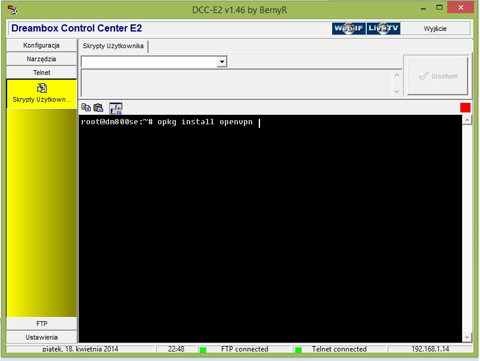
Step 1: An example of the configuration has been tested on Dreamobx 800se hd with openpli…
An example of the configuration has been tested on Dreamobx 800se hd with openpli 4.0 (php)opkg update opkg install openvpn(/php)
Step 2: Then, we have to download OpenVPN configuration files from our FTP:…
Then, we have to download OpenVPN configuration files from our FTP: /en/account/openvpn After downloading and unpacking the configuration file, edit the vpnonline-password.txt file Username and Password, type one above the other and save the changes: Copy one of OpenVPN configuration and vpnonline-password.txt file to: (php)etcopenvpn(/php)
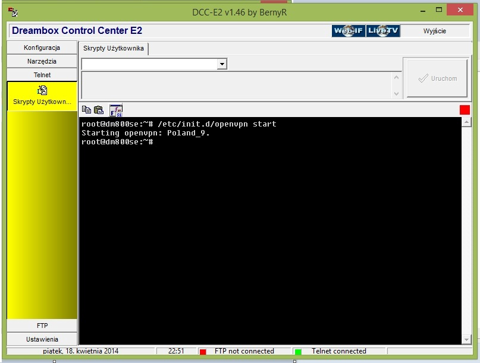
Step 3: If you have your own configuration files, remember to change the extension from…
If you have your own configuration files, remember to change the extension from *.opvn to *.conf Then, we can run the OpenVPN client by the command: (php)/etc/init.d/openvpn start(/php)
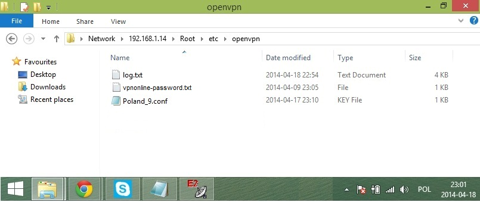
If the connection to the VPN server is not established correctly, we could check the log file, which is available:
(php)/etc/openvpn/log.txt(/php)
If you want to check, your public IP address after connected to our VPN server, type:
Check the connection
After the client connects, open the IP checker and compare the address and country with the selected server. Also test Internet access and DNS. A Connected status alone does not prove that all application traffic uses the tunnel.
If the connection fails
Authentication failed
Check the separate VPN username, connection password and service status in your account. Never include the password in a support request.
No Internet access or a certificate error
Download a fresh profile and check the device clock, DNS and routing. Keep certificate verification enabled. Include the device model, OS version and error message in a support request, with secrets removed.
Did this help?
We only store the answer, nothing about you.
Still not working?
Write to us. We will include this article's name, so we know what you already checked.